OneTouch Reveal® app
- 4.4
- Rating
- 1.00M
- Installs
- Free
- Price

 Analysis by App-foxy
Managing blood glucose is not only about taking a reading; it is also about making sense of that reading later, spotting patterns, and having useful information ready when a healthcare conversation comes around. OneTouch Reveal is built around that record-keeping problem. Developed by LifeScan, Inc., this free medical app gives people using compatible OneTouch equipment a digital place to review their diabetes data instead of relying entirely on memory or a paper log.
I found its main appeal in the way it turns scattered readings into something easier to follow. The app is not a replacement for a glucose meter, medical advice, or a treatment plan. It works best as a companion to the measuring routine you already have. When the connection behaves as expected, it can reduce the small but constant effort involved in copying numbers, checking dates, and preparing a clearer picture of what has been happening.
How OneTouch Reveal fits into everyday diabetes management
The app sits in the medical category and is available at no cost, with an Everyone age rating. Its current version is 5.17.0, and it requires operating system version 10 or later. Those details matter because the experience depends on more than simply installing the application: your phone needs to meet the requirement, and your OneTouch setup needs to work with the app’s intended data flow.
You May Also Like

 Blood Strike: 2.5 Anniversary
Blood Strike’s Loadouts Turn Every Drop Into a Tactical Gamble
A close look at Blood Strike’s custom loadouts: how fast access to signature weapons reshapes its battle royale rhythm, rewards preparation, and narrows the gap between fights.

 Pandora - Music & Podcasts
Pandora’s Music Is Easy to Start, but Harder to Recover
Pandora’s strength is its low-effort path from a seed to a station. Its weak spot is how much confidence it asks you to place in connection, setup, and quiet recovery.

 8 Ball Pool
 Is Built on Rivalries, Rematches, and Routine
A close look at the rivalries, rematches, shared routines, and unanswered safety questions that turn a quick pool match into a persistent mobile community.

 Samsung Music
’s Quiet Strength Is Playing What You Already Own
Its reach comes less from spectacle than from dependable access to a personal library. That simplicity is both the app’s strongest retention engine and its ceiling.

 AccuWeather: Weather Radar
AccuWeather Review: A Quick, Clear Forecast for Everyday Decisions
For everyday plans, the best forecast is the one you can understand quickly. AccuWeather makes rain timing, radar, and local conditions easy to act on, with a few trade-offs.

 Hill Climb Racing
Why Hill Climb Racing Still Turns Crashes Into One More Run
A tiny car, a bumpy hill and one more upgrade: Hill Climb Racing keeps resurfacing because its simple chaos makes every near-miss feel personal.
More From Our News Desk



LifeScan, Inc. has made this a widely used option. It has passed one million installs, with an average rating of 4.4 from roughly thirty-two thousand ratings and about eight thousand written reviews. I would treat those figures as evidence of broad interest rather than a promise that every meter, phone, or personal routine will feel equally smooth.
The first useful distinction is between recording a result and understanding a result. A basic meter can tell you the number at the moment of testing. A notebook can preserve that number. OneTouch Reveal is more helpful when you want to look across several readings and connect them with the circumstances around them, such as meals, medication routines, activity, or the time of day. That wider view is where a digital log earns its place.
For someone newly trying to become more organized, the app can make the transition less intimidating than a spreadsheet. You do not need to design columns, decide how dates should be formatted, or manually calculate a sequence of readings. The important habit is still the same: measure as directed, record accurately, and discuss meaningful changes with a qualified healthcare professional.
Connectivity is part of the experience, not a minor detail
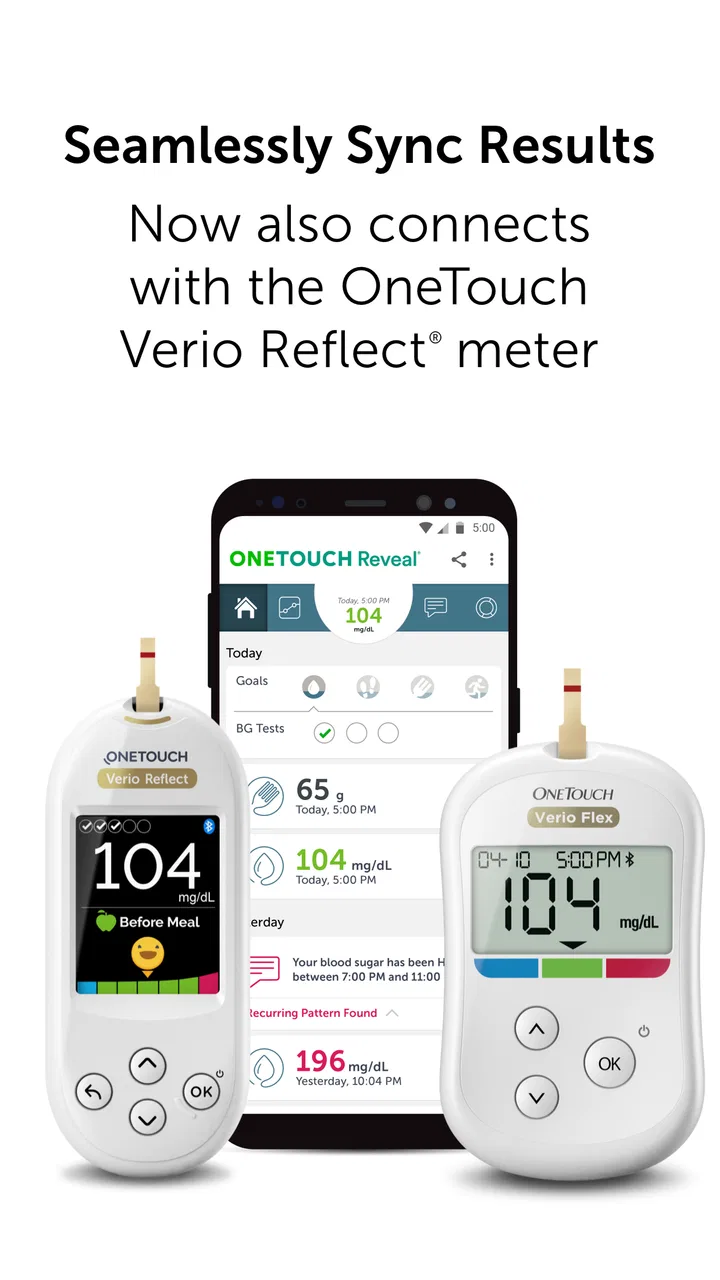
The most important practical issue is the route your readings take from the meter to the phone. A connected workflow can save time, but it also introduces another point where things may not go as planned. The meter, phone, app, and connection process all need to cooperate. If a result does not appear immediately, I would not assume the reading has vanished or that the app has interpreted it incorrectly. I would first check the device connection, open the app again, and compare the displayed history with the meter itself.
This is especially relevant when you are testing away from home. A person may take a reading in a car, at work, or during a busy morning and only expect to review it later. The convenience comes from not having to rewrite every result straight away, but the trade-off is that you should know how your particular setup transfers information before depending on it during an important appointment.
I would test the complete routine on an ordinary day rather than waiting for a stressful situation. Take a reading, allow time for the data to move, open the history, and confirm that the result appears where you expect it. Doing this early also reveals whether your phone’s operating system is supported and whether the meter-and-app combination feels practical in your hands.
Useful mobile contexts, from rushed mornings to clinic visits
One realistic use case is a weekday morning when breakfast, medication, and commuting compete for attention. You may not have time to write down a reading neatly, and a forgotten note can make the day’s record incomplete. A connected app can make the later review less dependent on memory. When you sit down in the evening, the value is not just seeing a number; it is being able to place that number alongside the rest of the day’s record.
Another useful situation is preparing for a healthcare appointment. Instead of bringing loose notes or trying to remember whether a particular pattern happened before lunch or after dinner, you can review the recorded information on your phone. That does not turn the app into a diagnostic tool, but it can help you ask more precise questions. For example, you might notice that a concern is occasional rather than constant, or that you need to pay closer attention to when readings were taken.
Family members and caregivers may also appreciate a clearer record, but this is where I would be careful. A person should understand who can see their information and how they want it handled before relying on shared access or showing the phone to someone else. The app may support a more convenient conversation, but convenience should not replace consent or a clear agreement about health information.
The mobile format is also useful for people who dislike carrying a separate paper diary. On the other hand, a phone is easier to misplace, silence, or leave uncharged than a small notebook. If your routine already works well with paper and you rarely need to examine trends, the app may add another task instead of removing one. Digital organization is helpful only when it fits the way you actually live.
What to do when a reading or connection does not behave
Recovery is part of any connected health routine. If a reading is missing, I would avoid immediately entering a guessed value just to make the timeline look complete. First, check the meter’s own record and look for the original result. If the app has not updated, close and reopen it, verify that the phone and meter are ready to communicate, and give the transfer another careful attempt.
If the result still does not appear, writing down the value and the time can protect the record until you understand what happened. The point is not to create a perfect-looking history; it is to preserve accurate information. A manually reconstructed entry without a reliable time or context could be more confusing than a clearly marked gap.
I also recommend keeping the meter available during the first few days of use. That gives you a reference when comparing what the device shows with what appears in the app. It is a simple but valuable check, particularly after an update, a phone change, or any adjustment to the connection routine.
There is an important safety boundary here. If a reading seems surprising, or if you feel unwell, the app should not be used to delay appropriate medical help. A display issue and a genuine glucose concern can look similar from the outside. Follow the instructions provided with your meter and your care plan, and contact a healthcare professional when a result or symptom requires attention.
Using the record without becoming overwhelmed by it
OneTouch Reveal is most useful when you decide what question you are trying to answer. Looking at every number repeatedly can create anxiety without producing a useful action. Instead, choose a small review window: perhaps the readings around meals, the difference between workdays and weekends, or the information you want to discuss at your next appointment. This makes the app a tool for reflection rather than a source of constant checking.
A practical habit is to add context as close to the reading as possible, while the event is still fresh. If you wait until the end of the day, you may remember the number but forget whether it followed a meal, exercise, a disrupted schedule, or something unusual. The more carefully you preserve context, the more useful the history becomes. Still, I would record only details that help your own management; excessive note-taking can make the routine difficult to maintain.
Another non-obvious trade-off is that a tidy digital history can create false confidence. A complete-looking timeline does not automatically explain why a result changed, and a pattern in the app is not the same as a medical conclusion. I would use repeated observations to guide questions for a clinician, not to independently change medication or treatment.
People who are data-conscious should also think about the phone itself. Avoid reviewing sensitive health information on a device that other people routinely use without protection. Keep your phone’s access controls in mind, and be deliberate about when you display the app in public. These are ordinary precautions, but they matter more when a personal health record is always in your pocket.
How it compares with paper logs and simpler meter routines
Compared with a paper diary, the app offers a more convenient way to revisit a growing set of readings and may reduce the burden of copying values by hand. Paper remains attractive for its simplicity and independence from a phone routine. It can also be easier to use when you want to jot down a quick note without opening an app. For people who rarely review their history, paper may be perfectly adequate.
Compared with a basic meter used on its own, OneTouch Reveal adds a layer of organization. The meter gives you the immediate result; the app is intended to help you examine the broader record. That distinction makes it a better fit for someone who wants to prepare for appointments or understand recurring situations, rather than someone interested only in the latest reading.
Compared with a general health journal, this app has the advantage of being centered on OneTouch diabetes-management data rather than asking you to build a tracking system from scratch. The limitation is equally clear: its usefulness depends on whether your existing equipment and personal routine fit the OneTouch ecosystem. If you use another brand or want one neutral app for many unrelated health measurements, a broader tracker may be more suitable.
I would also skip it if you are looking for a standalone medical decision-maker, a substitute for professional support, or a tool that removes the need to understand your meter. Its strength is organization and review. It is not a reason to ignore symptoms, alter treatment without guidance, or assume that a chart can explain every fluctuation.
Who will get the most from it
This is a strong match for people who already use compatible OneTouch equipment and want less manual record-keeping. It is particularly useful if you often need to explain your readings to a clinician, if you are trying to identify recurring situations, or if paper notes tend to become incomplete during busy days.
It can also suit a person who is motivated by visible history but does not want to build a spreadsheet. The key is consistency: the app becomes more valuable as the record becomes more accurate and meaningful. A few rushed entries will not tell you much, while a careful routine can support better conversations about your care.
I would be more cautious for someone with an older phone, unreliable connectivity habits, or no interest in reviewing patterns. The free price removes a financial barrier, but it does not remove the learning and maintenance involved in a connected workflow. Before making it central to your routine, confirm that your phone meets the minimum requirement and that the transfer process is comfortable.
My connectivity verdict
OneTouch Reveal succeeds when it stays in the background: readings are captured, the history is easy to revisit, and you can arrive at a healthcare conversation with a clearer record. Its biggest weakness is also tied to that strength. Every connected step can introduce friction, and a missing or delayed result needs a calm recovery process rather than blind trust.
After using it as a companion to regular testing, I see it as a sensible choice for OneTouch users who want a more organized view of their diabetes information. I would recommend setting it up on a normal day, checking the transfer routine before relying on it, and keeping the meter as the primary reference when something looks wrong. For the right user, the real benefit is not another place to see a number, but a more manageable way to understand the record around it.
LifeScan, Inc.’s app has been available since January 24, 2016, and its established presence helps explain why it remains familiar to many people managing diabetes. It is free to try, rated for Everyone, and currently listed as version 5.17.0 for operating system version 10 or later. My final view is straightforward: choose it when you want OneTouch readings to become easier to review and discuss, but choose a simpler paper routine or a broader health tracker when connectivity and brand compatibility would make the process harder than the problem you are trying to solve.
FAQs for OneTouch Reveal® app
01What is the purpose of the OneTouch Reveal® app?
The OneTouch Reveal® app is designed to help individuals with diabetes manage their condition more effectively. It syncs with OneTouch glucose meters to provide real-time data tracking, trend analysis, and personalized insights. This helps users understand their glucose patterns and make informed decisions about their health.
02Is the OneTouch Reveal® app compatible with all smartphones?
The OneTouch Reveal® app is compatible with most Android and iOS devices. However, it's important to check the app store for specific system requirements to ensure your device meets the necessary criteria for installation. Keeping your smartphone’s operating system updated can also help maintain compatibility.
03How does the OneTouch Reveal® app ensure data privacy?
The OneTouch Reveal® app prioritizes user privacy and security by using encryption to protect personal health information. Users can control their data sharing preferences within the app settings. It's recommended to review the app's privacy policy to understand how your data is managed and protected.
04Can the OneTouch Reveal® app connect to other health apps?
Yes, the OneTouch Reveal® app can integrate with various health apps and platforms, allowing users to consolidate their health data. This interconnectedness provides a more comprehensive view of one's health metrics. Check the app’s settings for details on compatible apps and how to enable these connections.
05Does the OneTouch Reveal® app offer customer support?
The OneTouch Reveal® app provides robust customer support through multiple channels. Users can access in-app help, visit the official website for resources, or contact customer service directly for assistance. This ensures that any issues or questions can be addressed promptly and effectively.
Pros
- User-friendly interface for easy navigation.
- Real-time data sync with compatible devices.
- Customizable alerts for glucose levels.
- Comprehensive data reports for insights.
- Secure data storage ensuring privacy.
Cons
- Limited device compatibility options.
- Occasional sync issues with older phones.
- Requires internet for full functionality.
- No offline data entry feature available.
- Limited customer support for app issues.

OneTouch Reveal® app
Gallery